July 2008 - Posts
I've written a lot about Hyper-V on this blog (some would say too much) but I'm going to carry on regardless. What I'll try to do is steer clear of the arguments about how it competes with alternative technologies and stick to technical details. After all, this blog's not really about news and comment - it's supposed to be technical.
John Howard published a detailed blog post when Hyper-V RTMed but I've spent a fair amount of time recently clearing up confusion about the various versions of Hyper-V, so I'll try and clarify things here:
Hopefully, that explains the various software products that include the Hyper-V branding or are in some way related to Hyper-V.
The Windows Server Team was the creation of Scotty McLeod - and Scotty continues to be our group leader.
Unfortunately though, Scotty had a serious accident several months back and, although he continues to make a steady recovery, no-one else knows how to administer this website (and I'm not going to bother him for the credentials as I want him to concentrate on getting better!)...
...that means that we have no way of finding out who our members are and no way to contact you should we do what we talked about at the community day in April (was that really 3 months back?) - namely to start to organise some events.
So, with that in mind, I've created a LinkedIn group to supplement this website. Many of you will know LinkedIn - a professional networking site - and I'd ask you all to join the Windows Server User Group UK on LinkedIn.
LinkedIn's terms of service for the group do require me to provide LinkedIn with a list of the names of our group members, if required; however we should have no worries about privacy as they also state that:
"LinkedIn participates in the EU Safe Harbor Privacy Framework and is certified to meet the strict privacy guidelines of the European Union. All relationships on LinkedIn are mutually confirmed, and no one appears in the LinkedIn Network without knowledge and explicit consent."
I look forward to seeing you over at LinkedIn and hopefully this will be the first step towards organising some user group events. In the meantime, Austin and I will keep on blogging over here and one day we should be able to get this website back to being the focal point for our community that Scotty originally intended it to be.
Even though choosing a hypervisor is only a small part of implementing a virtualisation strategy, much has been written about how Microsoft Hyper-V compares to VMware ESX - and
there are some fundamental differences between those two products. Architecturally, Hyper-V has a lot more in common with the Xen hypervisor (although they are not identical) and indeed XenSource worked with Microsoft to provide Linux support for Hyper-V and I've recently been alerted to the presence of
a short white paper which compares Hyper-V and the Xen technology implemented in Red Hat Enterprise Linux (the leading Linux distribution, which is not currently on the list of supported guest operating systems for Hyper-V). Despite being published by Microsoft, it seems to me to give a balanced view between the two products, although it should also be noted that
Red Hat has announced it will be switching from Xen to KVM for future virtualisation support.
One of the problems associated with virtualisation is "virtual sprawl" - the proliferation of virtual machines (which can totally negate the idea of "server consolidation" if not carefully controlled. Management becomes critical - and a key part of that management is patching virtual machines to keep the operating system and applications up to date.
But what about the virtual machines that exist as offline images (templates, test and development machines, etc.)?
I've written previously about the beta of Microsoft's offline servicing tool for virtual machine images and last week it was completed and released to the web.
The Offline Virtual Machine Servicing Tool works with System Center Virtual Machine Manager and, according to Microsoft, it "combines the Windows Workflow programming model with the Windows PowerShell interface to bring groups of virtual machines online just long enough for them to receive updates from either System Center Configuration Manager 2007 or Windows Server Update Services. As soon as the virtual machines are up-to-date, the tool returns them to the offline state in the Virtual Machine Manager library".
There's an executive overview on the Microsoft TechNet site and the tool can be downloaded from the Microsoft website.
At long last (and not before time), my corporate mail account has just been moved across to an Exchange Server 2007 system with Outlook Anywhere enabled. Unfortunately, I sold my Apple iPhone (which now has Exchange ActiveSync support) last week but I will be getting a new one at some time soon and there are many other benefits too - like that I no longer have to run a 32-bit VM to VPN into the corporate network and access my e-mail; and that the 2007 version of of Outlook Web Access is a huge step forward (even the "light" version for non-Microsoft and legacy browsers).
So, now that I can access Exchange from my 64-bit Windows Server 2008 workstation, I needed to configure an appropriate Outlook profile. Except that I couldn't find the mail applet in Control Panel, and Outlook 2007 only seemed to present the account settings for the currently loaded profile.
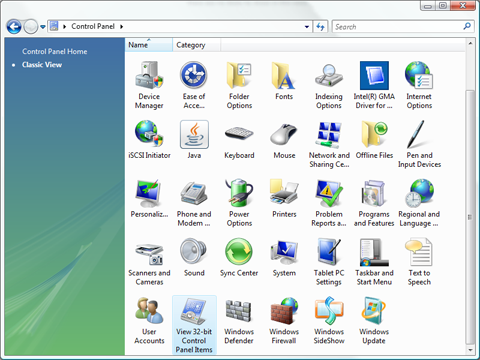
Then I noticed an innocuous icon in Control Panel, labelled View 32-bit Control Panel Items. Clicking on this exposed the Mail applet that is necessary in order to configure Outlook profiles.
I was at a VMware event yesterday where they proudly played this video...
...it's a bit of fun (and the music is really catchy - even if the lip sync is a bit out!) and was apparently first shown at VMworld a few months back.
It's not just VMware that can offer this type of solution though - I did use VMware Virtual Infrastructure (VI) in the design I produced for a server consolidation exercise with a "big four" accountancy firm a couple of years back but it was very expensive and required a huge leap of faith on the part of both the customer and the datacentre managed service provider. Now we're in the second half of 2008, I'm not sure if I would be using VMware products in my "virtualised hardware hotel". For a lot less money I could do the same thing with Windows Server 2008 and Hyper-V, together with System Center Virtual Machine Manager 2008. Some people will argue that the VMware products have maturity on their side and I'll concede that it's true - VMware did create the x86 virtualisation market - but a hypervisor (or virtualisation layer, in VMware-speak) is a commodity now and the simple fact is that I really can't justify advising my clients to spend the extra money on ESX and Virtual Center, especially as the Microsoft offerings under the System Center banner can be used to manage my virtual and physical infrastructure as one.
If only Microsoft produced viral videos like this, I could share one with you... so come on Redmond... give me something to play back at the VMware boys (and girls).
For the last few months, I've been running Windows Server 2008 as my desktop operating system. It's been rock solid, despite not being designed for laptop hardware and even if I can't hibernate (because I have Hyper-V enabled).
Earlier today I needed to set up a network printer but I was getting an access denied message when I tried to create the TCP/IP port using the standard Printers applet in Control Panel (even though my domain account is a member of the local Administrators group). The workaround that I found was to use the Print Management snap-in to add the port and then add the printer. This does require the Print Services role to be enabled (or remote server administration tools to be present) but it also provides a much better interface for the task.
In the week or so since
Hyper-V RTMed there has been a huge amount of coverage on various websites. Here's a roundup of some of the more useful articles that I've come across recently:
A few months back, I wrote about using the Microsoft Remote Desktop protocol to
access USB devices from within a Hyper-V virtual machine. At the time, I mentioned that this approach will also work for other local resources and James O'Neill recently highlighted that, as long as the Windows Audio service is running,
the Remote Desktop client can be used to bring sound from a virtual machine back to the device that is providing access (it's all part of a series James is writing on how to get the server he wants... perhaps he should read my post from a few months back on
running Windows Server 2008 as a client operating system).
I've posted quite a bit of information about Hyper-V on this blog - including the Hyper-V presentation I gave at Microsoft UK in April 2008 but TechNet Edge has some videos from the Windows Server Virtualization product team that go into a lot of the detail - and where better to learn about this than from the guys who created the product?
Interview with Mike Neil (Microsoft General Manager, Virtualization) about Hyper-V RTM, including:
- Why Microsoft decided to get into the server virtualization environment.
- Changes between the various release candidates and RTM.
- Challenges encountered along the way.
- Where Hyper-V is heading.
- IT Pro challenges for deploying Hyper-V.
Architectural overview:
- Virtual service provider (VSP) virtual service client (VSC) and VMBus.
- Disk operations within the Hyper-V architecture.
- Comparison of fixed, dynamic, and differencing VHD disks.
Snapshots:
- How virtual machine snapshots work.
- How to properly export a specific VHD/snapshot.
- Limitations with multiple branches of snapshots.
Backing up Hyper-V virtual machines:
- Virtual machine snapshots and Volume Shadow copy Service snapshots (VSS).
- How VSS snapshots function.
- What happens with a backup for VSS and a non-VS aware operating system (e.g. Linux or Windows 2000 Server).
Disks and iSCSI:
- Determine when to use a pass-through disk.
- How iSCSI works and how to use it with Hyper-V.
- Learn some best practices for using iSCSI.
High availability:
- Guest operating system clustering.
- Virtualization platform clustering.
How Microsoft uses server virtualisation for it's own IT.
Virtualisation is great but it's not a "one size fits all" solution - some workloads just don't make sense for virtualisation.
For many organisations, Exchange Server is one such workload but there are scenarios when it might be appropriate - at least for part of the messaging infrastructure. Up until now it's been unsupported (in any case, Exchange Server 2007 requires a 64-bit platform, and that wasn't available on a Microsoft virtualisation platform before the advent of Hyper-V) but Microsoft is running some of its Exchange Servers on Hyper-V and, as Andrew "Dugie" Dugdell commented a few days back, Exchange Server support for Hyper-V is on its way.
In a Hyper-V briefing last week, I asked Bryon Surace, a Senior Product Manager for Microsoft’s Windows Server Virtualization group, to clarify the situation with regards to Exchange Server support on Hyper-V and he explained that support for virtualisation is part of Microsoft's common engineering criteria for 2008:
"Windows Server virtualization Support Each server product must be capable of running within a Virtual Machine (VM) as provided by [Hyper-V] on Windows Server [2008]. Each server product must handle escalation and support running in a VM at the same level as was the product running directly on Windows Server."
Some of the product teams are still testing their products on Hyper-V but, according to Surace, Exchange
is supported but recommendations are to follow on implementation
(the Exchange Server product team committed to an announcement within 60 days of Hyper-V's RTM including a detailed support statement for Hyper-V, and a TechNet article with best practices).