Windows Server 2008 is a great workstation operating system too
 It took me months to convince my manager that I need a new laptop. Then it took me a few more to convince the IT department of the specification I needed (and to prise it out of their hands) but today I finally got my hands on it. It's nothing special - I'd like a ThinkPad but, as my employer owns one half of Fujitsu-Siemens Computers, it is a Lifebook S7210 - and it's not a bad machine either (especially as this one has 4GB of RAM in it). Why do I need that? Because I'm the technology lead for Windows Server 2008 and Hyper-V in our Microsoft Practice - and I want to "dogfood" the technology.
The thing is, that Windows Server 2008 is not really a client operating system. Except it can be... Windows Server 2008 has a lot in common with Windows Vista and with a few tweaks, I had got it working just as as I want it. A Windows desktop on steroids really:
- Step 1 is a notebook PC with hardware assisted virtualisation capabilities, No eXecute (NX)/eXecute Disable (XD) protection, and a 64-bit capable CPU. My Lifebook S7210 has all of those things, so on to step 2...
- Next, I needed an operating system - Windows Server 2008 Standard Edition would do the trick (after all I only have a single CPU and won't be clustering laptops!), but the licensing model for Windows Server and virtualisation lends itself to using Windows Server 2008 Enterprise Edition (64-bit).
- Windows Server 2008 is not a supported operating system for this hardware but Windows Vista is. Installing x64 drivers for Windows Vista got my graphics and WiFi up and running but I still need to find drivers for some of the other components (like the built in card-reader).
- Next, installing the server roles that I want to use - Hyper-V for starters. Just make sure that the BIOS support for Intel-VT or AMD-V and NX/XD is enabled first.
- With the operating system installed, it's time to get to work turning on some of the client features that are missing from a server operating system (thanks to Vijayshinva Karnure for his original post and subsequent follow-up, as well as this post from Stuart Maxwell):
- Turn off the Internet Explorer enhanced security configuration (ESC) - it's fine for servers that shouldn't be browsing the Internet anyway, but for a workstation it just gets in the way (and encourages bad practice by putting lots of sites into the trusted zone).
- Install the Desktop Experience feature - providing many of the Windows Vista capabilities that are not there by default in Windows Server 2008.
- Set the Themes service to start automatically - and start it.
- Ditto for the Windows Audio service.
- Install the Windows Search service (part of the File Services role) - Outlook will use this for indexing e-mail.
- Edit the local security policy to set Display Shutdown Event Tracker to Disabled
- Enable Windows Aero in the appearance settings (may require a reboot, and possibly re-installation of video drivers).
- In Control Panel, System, Advanced System Settings, Performance Options, set the required visual effects - I found that if I let Windows adjust for best appearance, it reverted to the Windows Vista Basic colour scheme but if I selected a custom configuration with all effects selected except Animate Controls and Elements inside Windows, I could keep Aero, complete with Flip 3D.

- Also in the advanced system settings, set the processor scheduling to favour programs.
- Enable Superfetch. Starting the Superfetch service will fail until some registry changes are made:
Services
Windows could not start the Superfetch service on computername.
Error 197: The operating system is not presently configured to run this application.
The solution is to create two new registry keys, after which the service should start successfully:
Windows Registry Editor Version 5.00 [HKEY_LOCAL_MACHINE\SYSTEM\CurrentControlSet\Control\Session Manager\Memory Management\PrefetchParameters] "EnablePrefetcher"=dword:00000003 "EnableSuperfetch"=dword:00000003
- Edit the power settings to allow hard disks to spin down after 20 minutes when running on mains power (and 5 when on battery power).
- Finally, install browser plug-ins (Flash, Silverlight, etc.) and application software (e.g. Microsoft Office).
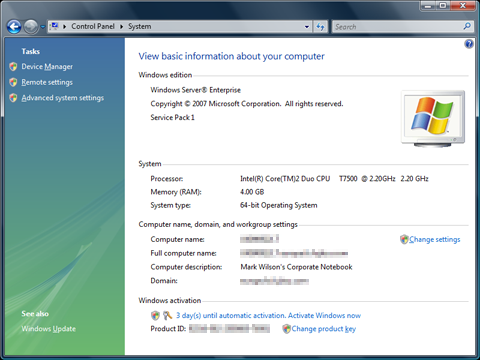
I still need to configure our corporate anti-virus solution and VPN software (I may have some problems there as it has a dependency on a firewall product that does not work with Vista SP1 or, I imagine, Windows Server 2008). Why we insist on it with the firewall built into Windows I still don't know but my VPN connection won't work without it. I also need to work out if I can get hibernation to work on Windows Server 2008. Once that's done, I should have a fully functional Windows Workstation 2008, with built-in hypervisor-based virtualisation. Sweet.